
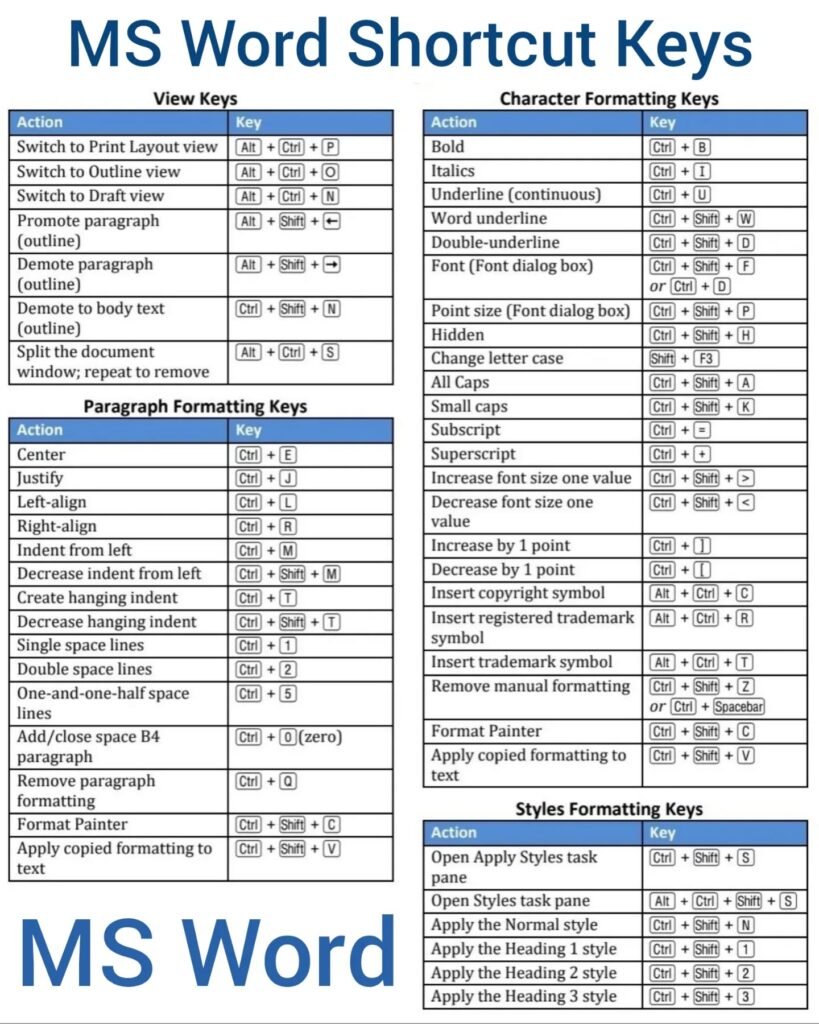
Essential MS Word Shortcut Keys
Mastering shortcut keys in Microsoft Word can significantly improve your productivity. Below is a comprehensive list categorized by key types.
Control (Ctrl) Keys
- Ctrl + A: Select all content
- Ctrl + B: Bold selected text
- Ctrl + C: Copy selected text
- Ctrl + D: Open the Font dialog box
- Ctrl + E: Center align the content
- Ctrl + F: Open the Navigation pane for searching
- Ctrl + G: Go to a specific page or section
- Ctrl + H: Open the Find and Replace dialog box
- Ctrl + I: Italicize selected text
- Ctrl + J: Justify the content
- Ctrl + K: Insert a hyperlink
- Ctrl + L: Left align the content
- Ctrl + N: Create a new document
- Ctrl + O: Open an existing document
- Ctrl + P: Print the document
- Ctrl + S: Save the document
- Ctrl + U: Underline selected text
- Ctrl + V: Paste copied text
- Ctrl + X: Cut selected text
- Ctrl + Y: Redo the last action
- Ctrl + Z: Undo the last action
Shift Keys
- Shift + Arrow Keys: Select text character by character
- Shift + Ctrl + Arrow Keys: Select text word by word
- Shift + F3: Change case of selected text
Alt Keys
- Alt + F: Open the File menu
- Alt + H: Open the Home tab
- Alt + N: Open the Insert tab
- Alt + P: Open the Page Layout tab
- Alt + W: Open the View tab
Windows Keys
- Windows + D: Show desktop
- Windows + E: Open File Explorer
- Windows + R: Open the Run dialog box
Function Keys
- F1: Open Help
- F7: Check spelling and grammar
- F12: Open the Save As dialog box
By familiarizing yourself with these shortcut keys, you can enhance your efficiency and streamline your workflow in Microsoft Word. Happy typing!